Skill Evolution
Every /aif-fix leaves behind a patch — a structured record of what went wrong and how it was fixed. /aif-evolve processes patches incrementally, analyzes your project's tech stack and conventions, and turns recurring patterns into rules that make skills smarter. The more you fix, the better the evolution.
When a similar AI Factory project already has useful patches, /aif-transfer can feed
only the applicable, anonymized prevention points into the same evolve workflow without
copying patches or identifying the source project.
Paths below show the default .ai-factory/ layout. config.yaml can relocate patch and evolution-log storage via paths.patches and paths.evolutions; skill-context remains fixed.
The Learning Loop
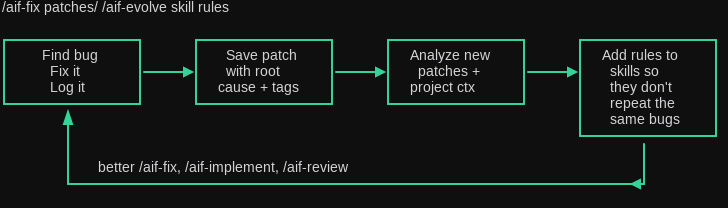
Text version
/aif-fix                patches/                /aif-evolve             skill rules

┌────────────────┐      ┌────────────────┐      ┌────────────────┐      ┌────────────────┐
│    Find bug    │      │   Save patch   │      │  Analyze new   │      │  Add rules to  │
│     Fix it     │─────▶│   with root    │─────▶│   patches +    │─────▶│   skills so    │
│     Log it     │      │  cause + tags  │      │  project ctx   │      │   they don't   │
└────────────────┘      └────────────────┘      └────────────────┘      │   repeat the   │
        ▲                                                               │   same bugs    │
        │                                                               └────────────────┘
        │                                                                       │
        │   better /aif-fix, /aif-implement, /aif-review                        │
        └──────────────────────────────────────────────────────────────────────◀┘
Patches supply hypotheses for targeted guards. /aif-evolve compares each proposed rule
with the current instructions on the same cases before offering it for approval.
Repeated failures alone do not prove that another instruction will improve behavior.
Incremental state file:
<paths.evolutions>/patch-cursor.json
- No cursor: first evolve run reads all patches
- Cursor present: evolve reads new patches newer than cursor, plus a small overlap window (reruns help catch missed points)
- Full rescan: delete cursor file and rerun
/aif-evolve
Skill-Context: Project-Specific Rules
What is Skill-Context
Built-in skills ship with AI Factory and get overwritten on update. To keep project-specific rules stable, /aif-evolve writes them to a separate location:
.ai-factory/skill-context/
├── global-skill-context.md       # All bundled skills (project-local)
├── build-skill-context.md        # fix, implement, plan, verify, improve only
└── <skill-name>/SKILL.md          # Individual exceptions and unique instructions
Key properties:
- Survives
ai-factory update— lives in your project, not in the package - Higher priority than base rules — when a skill-context rule conflicts with a base SKILL.md rule, the skill-context rule wins (same principle as nested CLAUDE.md files)
- Cumulative — each
/aif-evolverun adds new rules, updates existing ones, and removes stale ones
All files are optional. Existing individual contexts work without migration. Despite
its name, global-skill-context.md belongs to this project, not the user's home
directory; it does not install global skills. Custom/extension skills do not
automatically consume these files. The build group is fixed to the five skills
above and has no configurable membership.
Use shared layers for learned workflow prevention instructions. Keep project coding conventions in the existing rules hierarchy and architecture decisions in the architecture artifact; reference those instead of copying them into skill-context.
Context File Format
Important: skill-context files are always written in English, regardless of the project's language — they are consumed by AI agents, and English ensures consistent interpretation.
# Project Rules for /aif-fix

> Auto-generated by `/aif-evolve`. Do not edit manually.
> Last updated: 2026-02-15 14:30
> Based on: 12 analyzed patches

## Rules

### Null-check for optional relations
**Source**: 2026-02-10-09.15.md, 2026-02-12-16.45.md, 2026-02-14-11.20.md
**Rule**: Check for optional/nullable fields before accessing nested
properties. This is the #1 source of bugs in this project — 5 of 12
patches involved null references on optional DB relations.

### Prisma unique constraint
**Source**: 2026-02-13-10.00.md
**Rule**: Before `create()` calls on models with unique fields, check
for existing records with `findUnique()`. Use upsert when appropriate.
How Skills Use Context
Every bundled skill reads applicable files once at startup, before mode routing:
1. global-skill-context.md
2. build-skill-context.md  (only fix, implement, plan, verify, improve)
3. <skill-name>/SKILL.md
Precedence is individual > build > global > skill defaults on conflicting instructions; retain all non-conflicting instructions and unique parts. Apply the result to all outputs, templates, and reports. Missing files are skipped. An existing unreadable file stops dependent work and reports its path. Context cannot relax explicit project requirements, scope/ownership, privacy/safety, validation, or approval. The configured rules hierarchy keeps its existing precedence.
For example, a shared rule can require workflow reports to distinguish executed
checks from proposed checks; an individual verify rule can add the exact project
report format. A database-specific prevention rule that only helps fix should stay
in aif-fix/SKILL.md rather than affect planning or documentation generation.
Shared Evolution and Consolidation
Named evolve/transfer runs keep individual destinations. Only project all mode
may propose shared writes, after resolving every consumer from the bundled inventory
and freezing its ownership, base instructions and all applicable context layers.
Missing, replaced, ambiguous or unchecked consumers prevent shared changes; keep
the candidate individual or postpone it. --global never writes shared project files.
Evolve checks coverage and stale rules per consumer, including shared layers. One skill gaining a rule upstream does not make that rule stale for every other skill. Before approval, each affected consumer needs the existing baseline/candidate comparison, original cases and controls. A missing run or regression makes the whole shared candidate ineligible. Approval names the exact shared file and every consumer.
Moving duplicate rules is an explicit validated candidate, including deletions, provenance, applicability, and individual exceptions. There is no automatic migration. Originals remain if checks/application fail.
Equivalent consolidation must demonstrate reduced duplicate copies as a maintenance benefit; unchanged behavior is not a claimed behavioral improvement. Fewer stored copies do not establish token savings.
Shared
files use the same English rule format with Applies to: consumers. Empty shared
files may be removed, but their parent directory is never deleted.
Running /aif-evolve
Usage
/aif-evolve              # Evolve project skills only
/aif-evolve fix          # Evolve only /aif-fix
/aif-evolve implement    # Evolve only /aif-implement
/aif-evolve all          # Evolve project skills (explicit)
/aif-evolve all --global # Only existing user-global skills
/aif-evolve --global all # Same selection; flag order does not matter
Exact skill names win; only a missing exact name may use a verified built-in alias
such as fix → aif-fix. A leading invocation / is removed. Errors show the selected
scope and absolute locations actually searched. Ambiguous physical copies require a
choice; symlink aliases are deduplicated, and symlink escapes are rejected.
--global selects existing user-global skills for the active runtime, without installing
anything or mixing in project skills. If the runtime does not expose its global root,
evolve asks for an absolute path. Home paths are expanded and canonicalized before any
file tool call.
Project context can inform a global change, but approval names the exact absolute destination and its effect on every project using that skill. Evolution logs and the patch cursor stay in the current project. Global built-ins are skipped because there is no home-directory skill-context contract; the shared global layer above is project-local.
Workflow Overview
| Step | What happens |
|---|---|
| 0: Resolve target & load context | Parse scope and selector; freeze canonical entrypoint, owner/evidence, and write destination. Warn/skip managed or unknown targets. Read DESCRIPTION.md, eligible project built-in contexts, and evolve's own context once |
| 1: Collect intelligence | Read patches from paths.patches incrementally (first run reads all; later runs read only new patches by cursor + a small overlap window to catch missed points), extract each independent prevention point with its target skill(s), and build a Prevention Point Registry for the processed set (a patch with 5 points = 5 rows). Group by tags, find recurring patterns. Scan the project for conventions (linters, test patterns, error handling, logging, imports). For single-skill mode — focus convention scanning on areas relevant to that skill |
| 2: Read target skills | Load base SKILL.md only for target skills — not all. For /aif-evolve plan — read only aif-plan/SKILL.md. Keep in memory for Step 3 (no re-reads) |
| 3: Check for stale rules | Compare each skill-context rule against base SKILL.md. Classify as: fully covered (Case A), contradiction (Case B), partial overlap (Case C), or still unique (Case D). See Stale Rule Cleanup |
| 4: Present & resolve stale rules | Present stale rule findings to user in batches of up to 3 via AskUserQuestion. Apply keep/remove decisions; queue rewrites for candidate validation and final approval |
| 5: Analyze gaps | Re-read skill-context files modified in Step 4. Prevention-point-exhaustive analysis: iterate over every row in the Prevention Point Registry and check each (prevention_point × target_skill) pair independently. A prevention point is "covered" only when a rule addresses the specific action — not merely when the same patch filename appears in a Source field. A gap exists only if neither the base SKILL.md nor the current skill-context covers the specific prevention point |
| 6: Generate improvements | Create concrete, traceable improvements — each linked to specific patches or conventions. One prevention point = one rule. Preserve concrete formats from patches verbatim |
| 6.5: Validate candidates | Compare the current effective instructions and each exact rule change on the same original case, control, and relevant regression cases. Record outcomes, extra cost, and regressions; missing runnable evidence means postpone |
| 7: Present & apply | Show all candidate cards, ask for approval (apply validated candidates / let me pick / save report only). For "let me pick" — present in batches of up to 4. Apply only approved accept revisions; preserve negative and inconclusive outcomes in the evolution log under paths.evolutions |
| 8: Suggest next actions | Recommend /aif-review, next evolution timing, or new skill creation via /aif-skill-generator |
Skill Ownership and Write Destinations
Ownership comes from canonical paths and installation records/manifests, never an
aif-* prefix. Applied extension replacement records with matching physical
installation evidence take precedence over built-in names; a manifest declaration
alone does not establish replacement ownership.
For example, a user-owned aif-team-helper is custom, while an extension replacement
named aif-plan remains extension-managed.
If a replacement install fails and AI Factory restores the bundled skill without
an applied extensions[].replacedSkills entry, evolve resolves that restored target
as a built-in from its matching installation record. It can then propose project
skill-context improvements even while the extension manifest still declares the
unapplied replacement. Conflicting records and files leave ownership unresolved.
| Skill owner | Where rules are written |
|---|---|
| Verified AI Factory built-in, project scope | Individual .ai-factory/skill-context/<skill-name>/SKILL.md by default; shared files only after complete consumer resolution/validation in project all mode |
| Verified user-owned, project scope | Exact resolved skill entrypoint or approved nested file |
Verified user-owned, explicit --global |
Exact resolved absolute skill path, with cross-project impact stated before approval |
| Extension-managed (either scope) | Warning and skip; installed and extension source files stay unchanged |
| Global AI Factory built-in, unknown, or conflicting ownership | No writes; explain why, resolve uncertainty before proposing a named target |
Missing provenance does not imply user ownership; explicit ownership confirmation may
be needed. Every candidate, approval request, and log uses the same frozen target record.
Before writes or stale-context deletion, scope, ownership, and baseline are rechecked;
changed paths or instructions require renewed validation and approval. "Apply all"
never authorizes a skipped target. /aif-transfer retains its narrower project built-in
skill-context-only write boundary.
Comparing Rule Candidates
Each candidate card records the original problem, exact applicability condition, proposed instruction diff, and a control where the rule must not apply. Baseline means the current base skill plus current project instructions, including skill-context. Both versions use the same frozen inputs, initial state, checks, environment, and model settings where relevant. The card retains reproducible output evidence, per-case results, extra cost, and detected regressions.
For example, "always wrap writes in a transaction" may address a failure between related writes but trigger unnecessarily on an independent write. That control exposes an overly broad condition; a narrower candidate must be compared again.
Possible outcomes are accept, narrow the scope, refine, keep the old version, or postpone for lack of data. Only an exact revision with observed benefit and no detected regression can be offered for application. User approval remains required.
Equal behavior is recorded as the new rule did not improve behavior; no new instruction is added for that candidate. An equivalent consolidation additionally checks measured duplicate reduction as maintenance benefit, with every consumer preserving behavior.
Missing runs are NOTRUN, unavailable cost metrics are
UNKNOWN, and inconclusive comparisons are postponed.
When several rules will be applied together, their exact combination is also checked
on the union of their cases before application.
This step reuses a project's scenario mechanism when available. It does not introduce a new runner: without a reproducible evaluator or sufficient cases, the candidate is postponed. Evaluation must stay within the user's permitted resources and run/cost limit. Comparison details and the card template are in CANDIDATE-VALIDATION.md.
The evolution log preserves all candidate outcomes and revisions, even when none is applied, after approval to save the report. Negative results stay out of active skill-context. Saving a report alone does not advance the patch cursor by default; the existing explicit cursor decision still applies when no improvements were applied.
Stale Rule Cleanup
When AI Factory is updated, base SKILL.md files may incorporate rules that were previously only in your skill-context. Steps 3-4 handle this.
All decisions affect ONLY skill-context files. Evolve never proposes editing base skills/aif-*/ files — even if they contain errors, that is outside evolve's scope.
Base fully covers the rule
The upstream SKILL.md now contains an equivalent or more complete version of the skill-context rule (e.g., skill-context has Wave 1+3, base now has Wave 1+2+3).
Options:
- Keep in skill-context — has priority over base, ensures the complete version is always applied
- Remove from skill-context — trust base
- Rewrite skill-context rule
Rule contradicts base
A new base rule conflicts with your project rule.
Options:
- Keep skill-context rule — has priority, base version will be ignored
- Remove skill-context rule — trust base
- Rewrite skill-context rule
Partial overlap (either direction)
Base and skill-context overlap but neither fully covers the other. Evolution analyzes whether parts depend on each other (ordering, prerequisites).
Options:
- Rewrite skill-context to include both unique parts — recommended when parts are sequential
- Keep skill-context as-is — WARNING: base's unique parts will be lost (skill-context has priority)
- Narrow skill-context to uncovered part — when parts are independent
- Remove from skill-context — trust base (skill-context's unique parts will be lost)
Rule still unique
No overlap with base. Kept as-is, no action needed.
Stale rule decisions are collected in batches of up to 3 per AskUserQuestion call.
Keep/remove decisions take effect before gap analysis (Step 5); rewritten instructions
remain candidates until comparison and final approval. Explain this before the user
chooses Rewrite/Narrow: the existing rule remains active until its replacement is
validated as accept and approved. Unavailable execution or evidence postpones the
replacement; report any still-active conflict explicitly.
If all rules in a skill-context file are removed, the file and its directory are deleted.
Reusing Experience from a Similar Project
/aif-transfer /path/to/reference-project
/aif-transfer /path/to/reference-project fix
/aif-transfer reads the reference project's .ai-factory patch history as read-only,
untrusted evidence. It keeps a prevention point only when the current stack, architecture,
or code contains a matching risk. Before invoking the standard evolve approval/apply flow,
it removes source names, paths, patch filenames, repository metadata, and source-only code
or domain identifiers.
The transfer is intentionally ephemeral:
- source patches are never copied into current
paths.patches - current
patch-cursor.jsonis never read or advanced for transferred evidence - persisted source labels are anonymous
experience-NNNIDs - candidate comparisons use current-project or neutral cases; cards and evidence follow the same privacy checks
- report-only logs can preserve negative or postponed outcomes after explicit save approval
- privacy is checked again in every changed skill-context and evolution-log file
- no applicable prevention points means no artifacts are created
The source project is never modified. Approved outputs retain normal /aif-evolve
ownership under .ai-factory/skill-context/* and paths.evolutions.
When to Evolve
- After 5-10 fixes — enough patches for meaningful pattern detection
- After changing tech stack — new framework or library means new pitfalls to learn
- When the same bug type keeps recurring — a signal that skills need a targeted guard
- After an
ai-factory update— stale rule cleanup removes rules now covered upstream
See Also
- Development Workflow — where
/aif-evolvefits in the development loop - Core Skills — full reference for
/aif-evolveand other skills - Plan Files — patches, plans, and other workflow artifacts