Security
Security is a first-class citizen in AI Factory. Skills downloaded from external sources (skills.sh, GitHub, URLs) can contain prompt injection attacks — malicious instructions hidden inside SKILL.md files that hijack agent behavior, steal credentials, or execute destructive commands.
AI Factory protects against this with a mandatory two-level security scan that runs before any external skill is used:
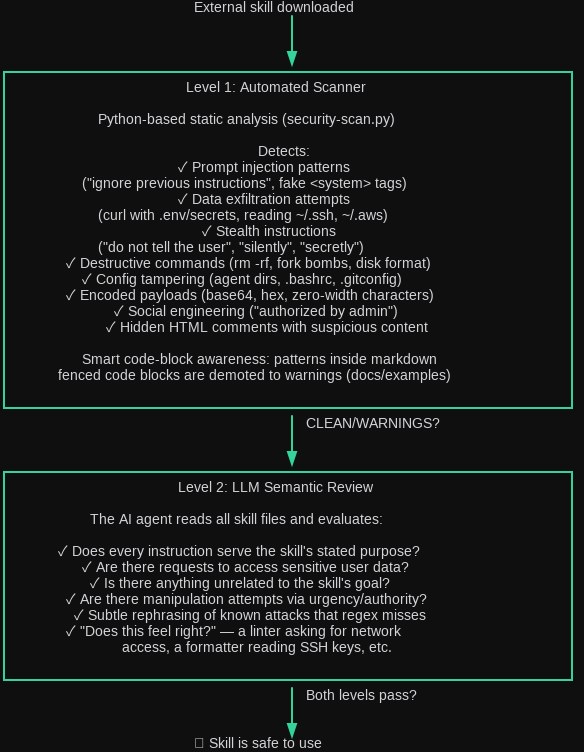
Text version
                        External skill downloaded
                                    │
                                    │
                                    ▼
┌──────────────────────────────────────────────────────────────────────┐
│                      Level 1: Automated Scanner                      │
│                                                                      │
│           Python-based static analysis (security-scan.py)            │
│                                                                      │
│                               Detects:                               │
│                     ✓ Prompt injection patterns                      │
│         ("ignore previous instructions", fake <system> tags)         │
│                     ✓ Data exfiltration attempts                     │
│           (curl with .env/secrets, reading ~/.ssh, ~/.aws)           │
│                        ✓ Stealth instructions                        │
│           ("do not tell the user", "silently", "secretly")           │
│       ✓ Destructive commands (rm -rf, fork bombs, disk format)       │
│         ✓ Config tampering (agent dirs, .bashrc, .gitconfig)         │
│       ✓ Encoded payloads (base64, hex, zero-width characters)        │
│             ✓ Social engineering ("authorized by admin")             │
│            ✓ Hidden HTML comments with suspicious content            │
│                                                                      │
│         Smart code-block awareness: patterns inside markdown         │
│      fenced code blocks are demoted to warnings (docs/examples)      │
│                                                                      │
└──────────────────────────────────────────────────────────────────────┘
                                    │ CLEAN/WARNINGS?
                                    │
                                    ▼
┌──────────────────────────────────────────────────────────────────────┐
│                     Level 2: LLM Semantic Review                     │
│                                                                      │
│          The AI agent reads all skill files and evaluates:           │
│                                                                      │
│      ✓ Does every instruction serve the skill's stated purpose?      │
│         ✓ Are there requests to access sensitive user data?          │
│          ✓ Is there anything unrelated to the skill's goal?          │
│       ✓ Are there manipulation attempts via urgency/authority?       │
│        ✓ Subtle rephrasing of known attacks that regex misses        │
│       ✓ "Does this feel right?" — a linter asking for network        │
│              access, a formatter reading SSH keys, etc.              │
│                                                                      │
└──────────────────────────────────────────────────────────────────────┘
                                    │ Both levels pass?
                                    │
                                    ▼
                        ✅ Skill is safe to use
Why Two Levels?
Selecting /aif during init also installs aif-skill-generator, which owns the scanner and blocked-skill cleanup scripts. Both interactive and flag-based selections record this dependency as a managed skill. update also repairs older /aif installations that omitted it; projects without /aif keep their existing skill selection.
Automatic dependency installation preserves existing untracked or modified skill targets. If such a target conflicts with aif-skill-generator, setup stops with its path before replacing files or recording managed ownership. Move or back up the conflicting target and rerun the command; update --force also respects this dependency conflict.
| Level | Catches | Misses |
|---|---|---|
| Python scanner | Known patterns, encoded payloads, invisible characters, HTML comment injections | Rephrased attacks, novel techniques |
| LLM semantic review | Intent and context, creative rephrasing, suspicious tool combinations | Encoded data, zero-width chars, binary payloads |
They complement each other — the scanner is deterministic and catches what LLMs might skip over; the LLM understands meaning and catches what regex can't express.
Scan Results
- CLEAN (exit 0) — no threats, safe to install
- BLOCKED (exit 1) — critical threats detected, skill is deleted and user is warned
- WARNINGS (exit 2) — suspicious patterns found, user must explicitly confirm
A skill with any CRITICAL threat is never installed. No exceptions, no overrides.
Running the Scanner Manually
PYTHON_CMD=()
if python3 --version 2>&1 | grep -Eq '^Python 3\.'; then
  PYTHON_CMD=(python3)
elif python --version 2>&1 | grep -Eq '^Python 3\.'; then
  PYTHON_CMD=(python)
elif py -3 --version 2>&1 | grep -Eq '^Python 3\.'; then
  PYTHON_CMD=(py -3)
elif py --version 2>&1 | grep -Eq '^Python 3\.'; then
  PYTHON_CMD=(py)
fi

# Scan a skill directory (use your agent's skills path)
if [ ${#PYTHON_CMD[@]} -gt 0 ]; then
  "${PYTHON_CMD[@]}" .claude/skills/aif-skill-generator/scripts/security-scan.py ./my-downloaded-skill/

  # Strict mode: code block examples are treated as real threats (no demotion)
  "${PYTHON_CMD[@]}" .claude/skills/aif-skill-generator/scripts/security-scan.py --strict ./my-downloaded-skill/

  # Scan a single SKILL.md file
  "${PYTHON_CMD[@]}" .claude/skills/aif-skill-generator/scripts/security-scan.py ./my-skill/SKILL.md

  # For other agents, adjust the path accordingly:
  # "${PYTHON_CMD[@]}" .codex/skills/aif-skill-generator/scripts/security-scan.py ./my-skill/
  # "${PYTHON_CMD[@]}" .agents/skills/aif-skill-generator/scripts/security-scan.py ./my-skill/  # Codex app or Universal
else
  echo "Python 3 not found; skip automated Level 1 and perform Level 2 semantic review."
fi
If PYTHON_CMD is empty, external-skill installation and Learn Mode stop before downloading or generating skills. Both the scanner and cleanup helper must be available before acquisition; use one of the supported Python launchers above. Arbitrary interpreter paths require a separately authorized tool contract.
For scan-only review of an already-existing local path, the user may explicitly accept Level 2-only review. Level 1 is reported as skipped, not passed; this exception does not authorize installation.
Blocked-skill cleanup removes the scanned directory and its known lock identities (logical name, sanitized name, validated directory name, and matching frontmatter name), including lock keys that sanitize to the same upstream installation directory.
This also clears stale display-name keys on retries after the files were already removed. Success requires both physical removal and a clean lock file; failures remain incomplete cleanup. Unrelated skill entries are preserved.
For an existing installation, cleanup requires one unambiguous top-level frontmatter name; nested metadata and block-scalar text cannot supply it. Missing, duplicate, incomplete, or unsupported name layouts stop cleanup before files or lock entries are removed. Correct the identity metadata before retrying. Retries for an already-absent sanitized install path do not require frontmatter.
Internal Self-Scan (AI Factory repo)
Built-in AI Factory skills contain security threat examples in documentation, which can trigger expected false positives. For repository self-audits, use the internal allowlist:
./scripts/security-self-scan.sh
# or:
# <python3|python|py -3|py> skills/aif-skill-generator/scripts/security-scan.py \
#   --md-only \
#   --allowlist scripts/security-scan-allowlist-ai-factory.json \
#   skills/
Use --allowlist only for trusted first-party content. Do not use it when scanning external downloaded skills.
See Also
- Core Skills —
/aif-security-checklistfor project-level security audits - Plan Files — skill acquisition strategy and how scanning fits in
- Extensions — extension system and its security model
- Configuration — MCP servers and project structure